
Monroe County VINE Coverage
Mississippi runs its verified custody-notification program through Mississippi SAVIN. MDOC says the service sends confidential automated notices about people in participating county jails. It also covers people held in MDOC custody. No county-by-county participation list is published. That means the state page alone cannot promise coverage for the Monroe County Detention Facility.
On VINELink, pick Mississippi and search for the Monroe County record or facility you need. A hit can support a custody check and registration. A blank result calls for a call to MS SAVIN or MCSO. Silence can mean nonparticipation or a fresh booking lag. It can also mean a spelling mismatch, a transfer, release, or custody in a different system.
Run a Monroe VINE Arrest Check
Have enough identity detail ready first. Guessing at a partial name invites the wrong record. The live application changes its search fields over time, so follow the current prompts rather than assuming every box must be filled.
- Open the official VINELink search and select Mississippi.
- Choose a person search and enter the name or identifier requested.
- Review possible matches for facility, status, and identifying details.
- Open the matching record and note the status time shown.
- Use registration only after confirming the correct person.
The VINELink search screen is the official public starting point.

The VINELink search screen shows the lookup path plainly. It offers no gallery of people. It also republishes no custody photographs. When a name matches, check the facility and any age or birth detail shown. Also confirm the offender identifier and the custody state. A name alone proves nothing. Note the time of your lookup. A later transfer or release can change the answer entirely.
What Monroe VINE Results Show
VINE centers on custody and notification. It is not the Monroe County jail docket, a full arrest report, or a court judgment, and the exact fields depend on the source record.
| Possible field | What it means |
|---|---|
| Name and offender identifier | Helps distinguish the person from similar matches. |
| Custody status | Reports the state entered by the participating agency. |
| Facility or agency | Shows the reported custodian, which may change. |
| Transfer or return | Signals movement or renewed custody in the system. |
| Release event | Reports a custody change, not the court’s disposition. |
| Registration option | Lets an eligible user request automated notice. |
A release event is not a dismissal of charges. A transfer does not prove state sentencing. For custody detail, check the official jail or MDOC record. The case result belongs to the proper court.
Register for Monroe Custody Alerts
Registering is separate from searching. Open the correct record first, then pick the notification route VINELink offers and finish each confirmation step. The state says the public may register, while a separate MDOC form serves direct victims and survivors.
- Confirm the person and current custodian before selecting notifications.
- Choose the available event notices, such as release, transfer, return to custody, escape, or absconding from supervision.
- Enter the phone, email, or text contact method offered.
- Create and retain any PIN or notification identifier requested.
- Complete verification and keep the registration confirmation.
The VINELink registration route shows the alert workflow.
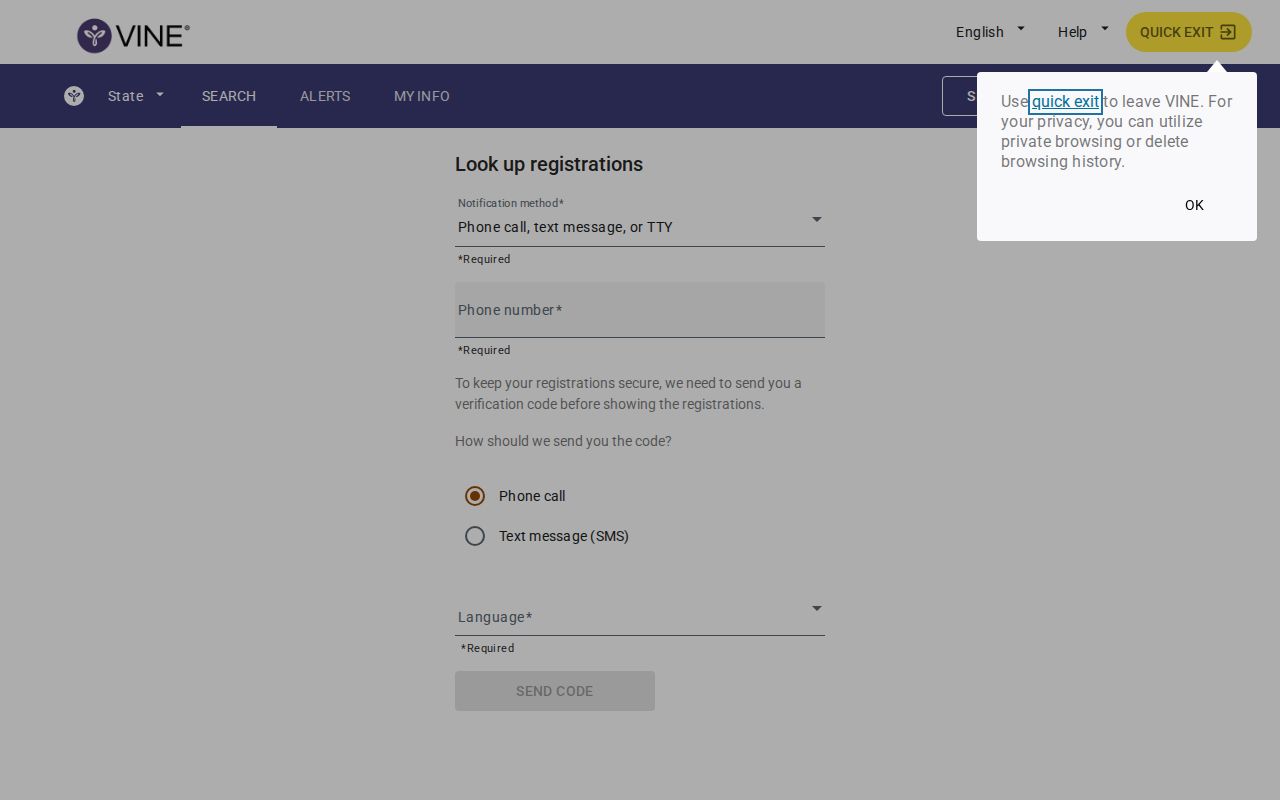
The VINELink registration screen marks the spot. Signup begins there after the correct custody record is located. Keep your contact details current. Guard the PIN. An automated call may ask for it. Enter the PIN only as the official registration process directs. When immediate safety planning is needed, never lean on one alert alone.
Mississippi SAVIN Contact Routes
Mississippi lists several routes for a failed search. MS SAVIN answers at (601) 359-5759 during standard business hours. A 24-hour representative is available at (888) 9-MSSAVIN, or (888) 967-7284, in English and Spanish. The TTY line is (866) 847-1298.
The SAVIN notification page explains what triggers alerts. Changes entered into an offender's electronic file set them off. Those changes may include transfer, release, return to custody, escape, or absconding from supervision. The service exists for notice, not photo publication. Treat it as a custody alert system, not a mugshot archive.
Note: A notification is only as current as the custody data supplied to the participating system.
Fresh Monroe Arrests Can Lag
A new county booking may not appear right away. Monroe County's official site publishes no public roster. There is no same-day feed, no update clock, and no stated intake lag. The person may still be in city custody. The status could be moving to MCSO, awaiting entry, released, or held elsewhere. Nettleton sits across the Monroe-Lee line. That split can steer a search toward the wrong county system.
For current county custody, call the Monroe County Sheriff's Office at (662) 369-2468. Ask whether the person is housed, recently released, transferred, or held for an outside authority. A city arrest belongs to that city department first. The Arrested Today page lays out the same-day city-to-county sequence.
When nothing appears live, MS SAVIN can still help. It can confirm whether Monroe participates. It can also show whether the person sits in another covered system. Treat silence from an automated search as a maybe, never a firm no.
County, State, and Federal Custody
Each system covers a different stage. MCSO handles local county detention. The MDOC Inmate Search covers state prisoners and parolees, showing state identifiers, location, sentence information, and sometimes a photo. SAVIN spans participating county facilities and MDOC events. None of these is a federal locator.
The Bureau of Prisons keeps its own locator for federal prisoners. ICE runs a separate detainee locator. U.S. Marshals custody and booking-photo disclosure follow federal rules. The Monroe County facility lists no ICE detention contract, so a county result cannot support any inference about federal or immigration custody.
Use the Monroe County recent-arrests guide to tell apart county booking records, court dispositions, MDOC records, and federal routes. The agency holding the person now may not be the agency that made the arrest.
Manage Monroe VINE Notifications
Check your registration whenever custody changes hands. A move from the county jail to MDOC can change the record or identifier tied to your alerts. Take a minute to confirm the registration still tracks the right person in the right system. Keep the confirmation saved somewhere safe, and never post the PIN or your private contact details anywhere public.
Delays happen. An alert can arrive after the event because it depends on agency entry and delivery systems. If timing matters for your safety, pair VINE with direct agency contact and a personal safety plan. MS SAVIN keeps a representative on the line around the clock. They handle notification questions. MCSO can tell you where someone is housed in the county right now. For immediate danger, call 911.
The MDOC DVS and SAVIN form is a separate victim-services route. It asks for offender identifiers and requester contact information. It also describes email, telephone, and text notice options. General public users can register through VINELink instead. Picking the right route keeps a notification request from getting tangled up with a public-record request.
VINE Alerts Are Not Verdicts
A VINE alert only reports a custody event. Release can follow bond, sentence completion, or a court order. It may also follow transfer or another change. A return to custody may involve a separate matter. That matter can be entirely new. For the formal disposition, the court docket and judgment are the documents to consult.
Bring urgent custody questions straight to the responsible agency. Save the offender identifier and your registration confirmation, and keep private alert details to yourself. In immediate danger, use emergency services rather than waiting on a system update.